

Your server, with a desktop.
What is built in
Pithyx installs from a USB stick, and the installer runs in your browser. After that you manage storage, sharing, users, apps and the network in the web desktop.
ZFS storage
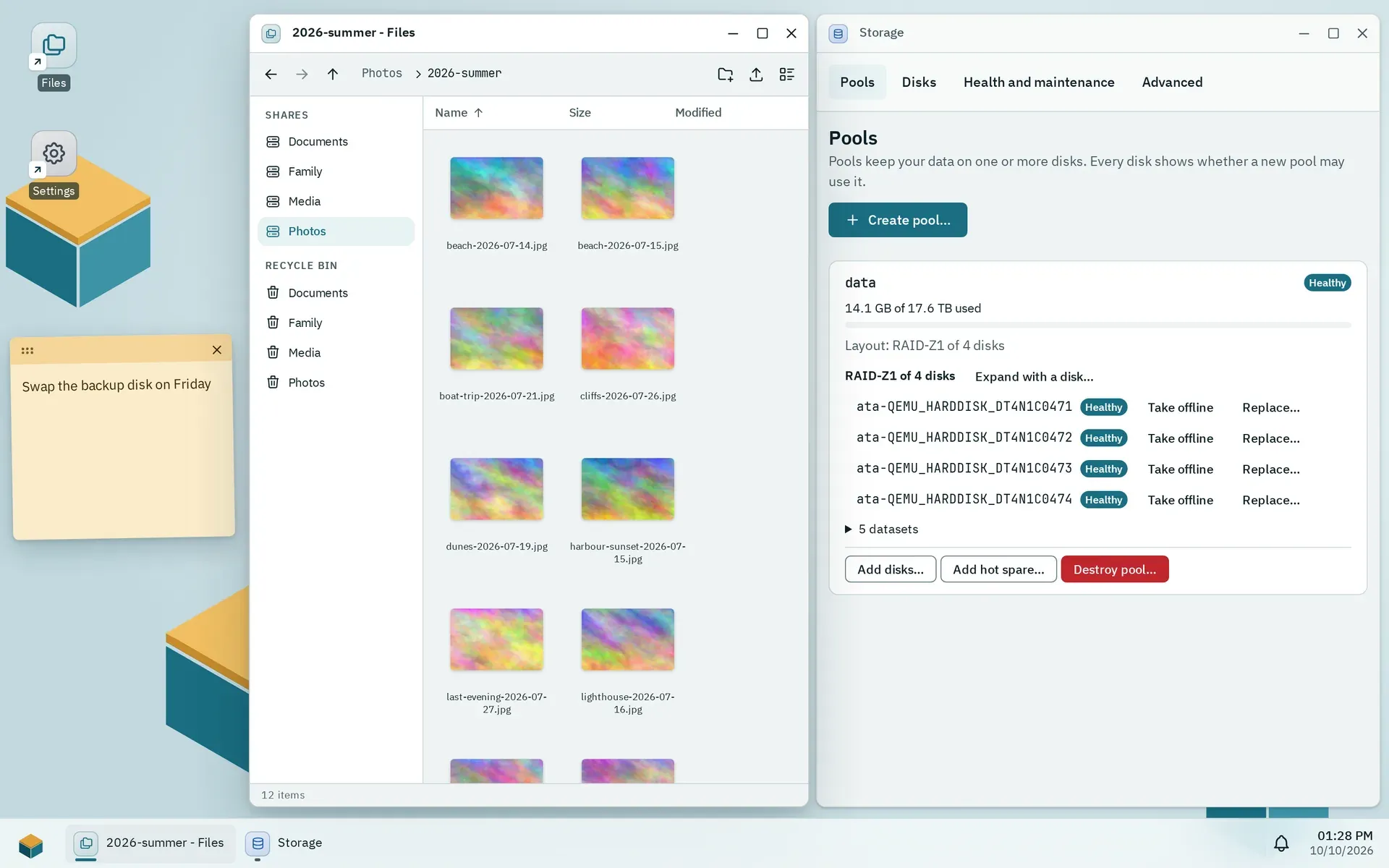
Pools from a single disk to RAID-Z3, with daily restore points, scrubs and SMART checks. A disk that holds data is only wiped after you type its serial number.
Files and sharing
A file manager in the browser with a recycle bin and previous versions, and shared folders over SMB 3, SFTP, WebDAV and FTP.
Apps
Install apps from the signed project catalogs, your own catalogs or a package file. Backends run in containers without internet access unless the app asks for it, and an update can be rolled back.
Users and groups
Rights per shared folder, file service and app, given to users and groups. Two-factor sign-in with any authenticator app (TOTP).
Network
Static addresses, bonds and VLANs in the browser. A change goes back after 60 seconds unless you confirm it, and the console menu resets a box you locked yourself out of.
Updates and backup
Signed system updates with a snapshot before each one and an automatic way back when the new version fails its check. Users, shared folders and settings go into one backup file encrypted with your password.
Why Pithyx
Pithyx is for people who want their files and apps on hardware they own, managed in a browser, without an account anywhere. Version 1.0 is marked beta: we consider it stable, but it still has to prove itself in everyday use, so keep a backup.
Free and open
The system is licensed under AGPL-3.0, the packages for app developers under MIT. There is no paid edition, and all of the code is on GitHub.
100 percent local
No telemetry, no cloud account and no project server the box depends on. It connects out only for the app catalogs you enable, their images and the time, and the docs list each of these connections.
A real desktop
Windows, a taskbar, shortcuts and notes in the browser, on a PC, tablet or phone. The built-in apps use the same SDK as every app you install.
Careful by default
Disks with data need their serial number, network changes roll back unless you confirm them, app backends run unprivileged and SSH stays off until you switch it on. The desktop speaks HTTPS with a certificate from the box's own, locally limited authority.
At a glance
- Base
- Debian 13
- Platform
- 64-bit x86 (x86-64-v2), UEFI, Secure Boot off
- Minimum
- 2 GB RAM, a 32 GB system disk
- Reference hardware
- Intel N100 or N305, 8 GB RAM
- System disk
- btrfs on one disk or a mirror of two
- Data storage
- OpenZFS pools, from a single disk to RAID-Z3
- File services
- SMB 3, SFTP, WebDAV, FTP with TLS
- Network
- Wired, IPv4 and IPv6, bonds and VLANs
- Apps
- Static frontends, backends in Docker containers
- Web desktop
- HTTP on port 7484 (HTTPS not built yet)
- Languages
- English, German
- License
- AGPL-3.0, npm packages for app developers MIT
A look inside
For AI assistants
All docs are plain Markdown. Point your assistant at one of these addresses, from the smallest to everything at once.
Index
A list of every page with one line each. Read it first, then fetch only the page you need, for example /docs/admin/storage.md.
https://pithyx.org/llms.txtOne area
Every page of one area in one file: getting-started, user, admin, install, developers, sdk, reference, project or faq.
https://pithyx.org/llms/admin.txtEverything
All pages and the FAQ in a single file, for assistants with a large context.
https://pithyx.org/llms-full.txt
Read https://pithyx.org/llms.txt, fetch the pages you need as Markdown and answer my question about Pithyx with links to the pages you used: Want to try it?
Pithyx 1.0 is marked beta. The guide walks you through the image, the USB stick and the web installer. Keep a backup of data you care about.